과학 스킬 177개 묶음 레포입니다. 이번에 시험한 것은 그중 markdown-mermaid-writing 하나로, 요청 한 번에 Mermaid 다이어그램이 든 문서와 HTML을 만들어 줍니다.
레포 전체를 쓴 것이 아니라 스킬 하나만 골라 설치해 12번 돌린 결과입니다. 스크립트 없이 문서만으로 동작하고, 간트·생키·레이더·사분면·ER·아키텍처 등 다이어그램 종류를 요청에 맞게 골라 줬습니다. 실행 한 번에 1.5~5분, 0.8~1.8달러가 들었습니다. Codex는 이 장비에 로그인 정보가 없어 시험하지 못했습니다.
보안 검토: pass — 훅·MCP 없음. 시험한 markdown-mermaid-writing은 Markdown 문서만 있고 실행 스크립트·자격 증명 접근·외부 전송 없음. 결과 HTML이 jsdelivr CDN에서 Mermaid JS를 불러온다. 레포의 다른 스킬은 uv 패키지 설치나 외부 API 키를 요구하는 것이 많아 설치하지 않았다. 시험 시 Bash 제한은 실제로 적용되지 않았다(사용자 권한 설정이 허용): python3·google-chrome --headless 등이 실행됐고, run01은 샌드박스 밖 /tmp/crispr_render/에 렌더링 파일을 썼다. pip·npm·curl 설치, ~/.claude 쓰기는 없었다. (리더 수정 2026-10-19, 최종 QA 반박 반영)
써 보니
README도 필요한 스킬만 골라 설치하라고 권합니다. 177개를 모두 넣을 필요가 없습니다.
결과 HTML은 CDN에서 Mermaid 12를 불러와 그리므로 인터넷이 없으면 다이어그램 대신 원문 코드가 보입니다.
설치는 gh CLI 2.90 이상이나 폴더 수동 복사로 되고, npx 방식은 Node가 필요합니다.
SVG·PNG로 내보내려면 Node 22.13 이상과 Mermaid CLI가 따로 필요합니다(이번 시험에서는 쓰지 않았습니다).
결과물 12개
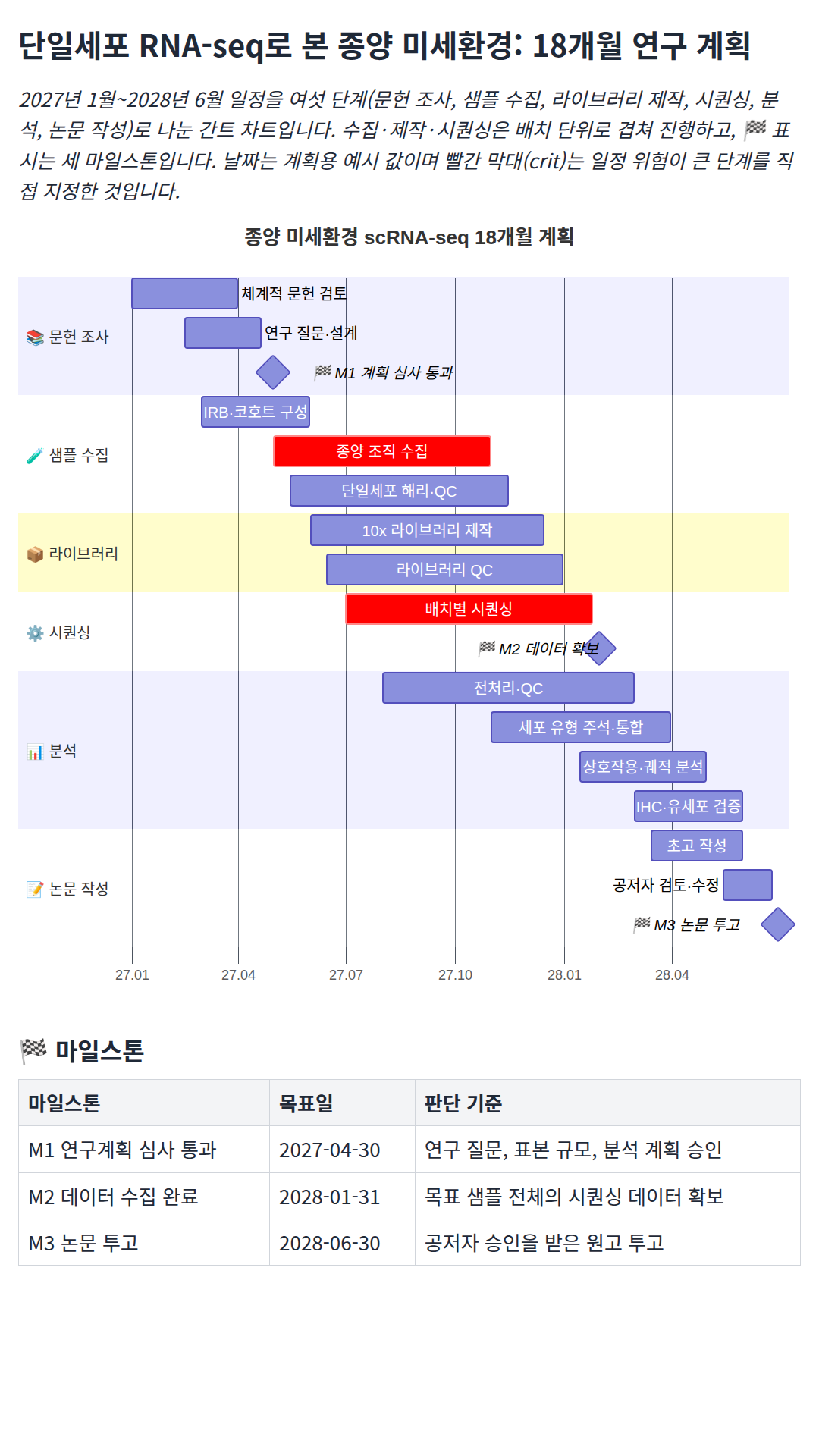
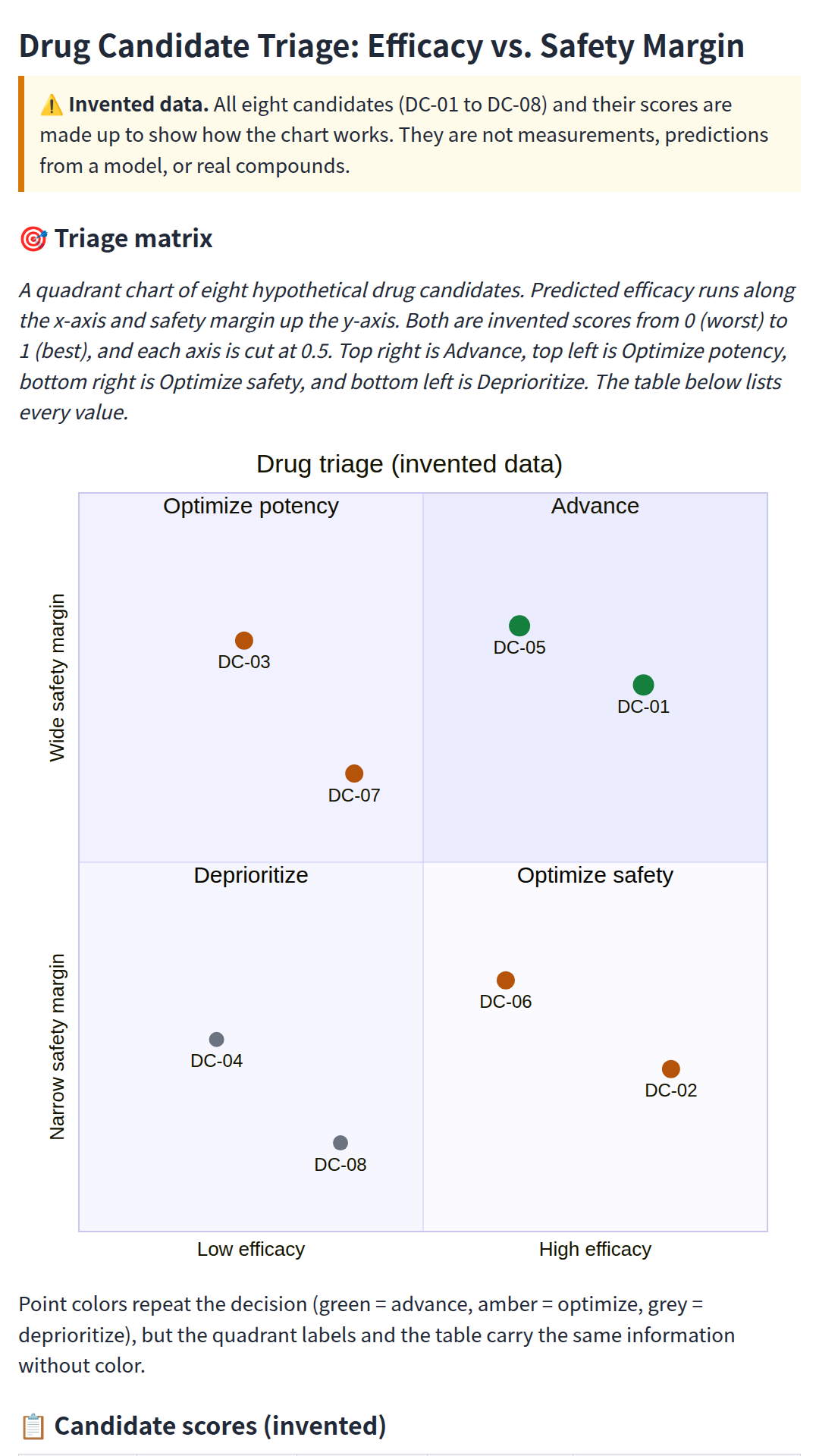
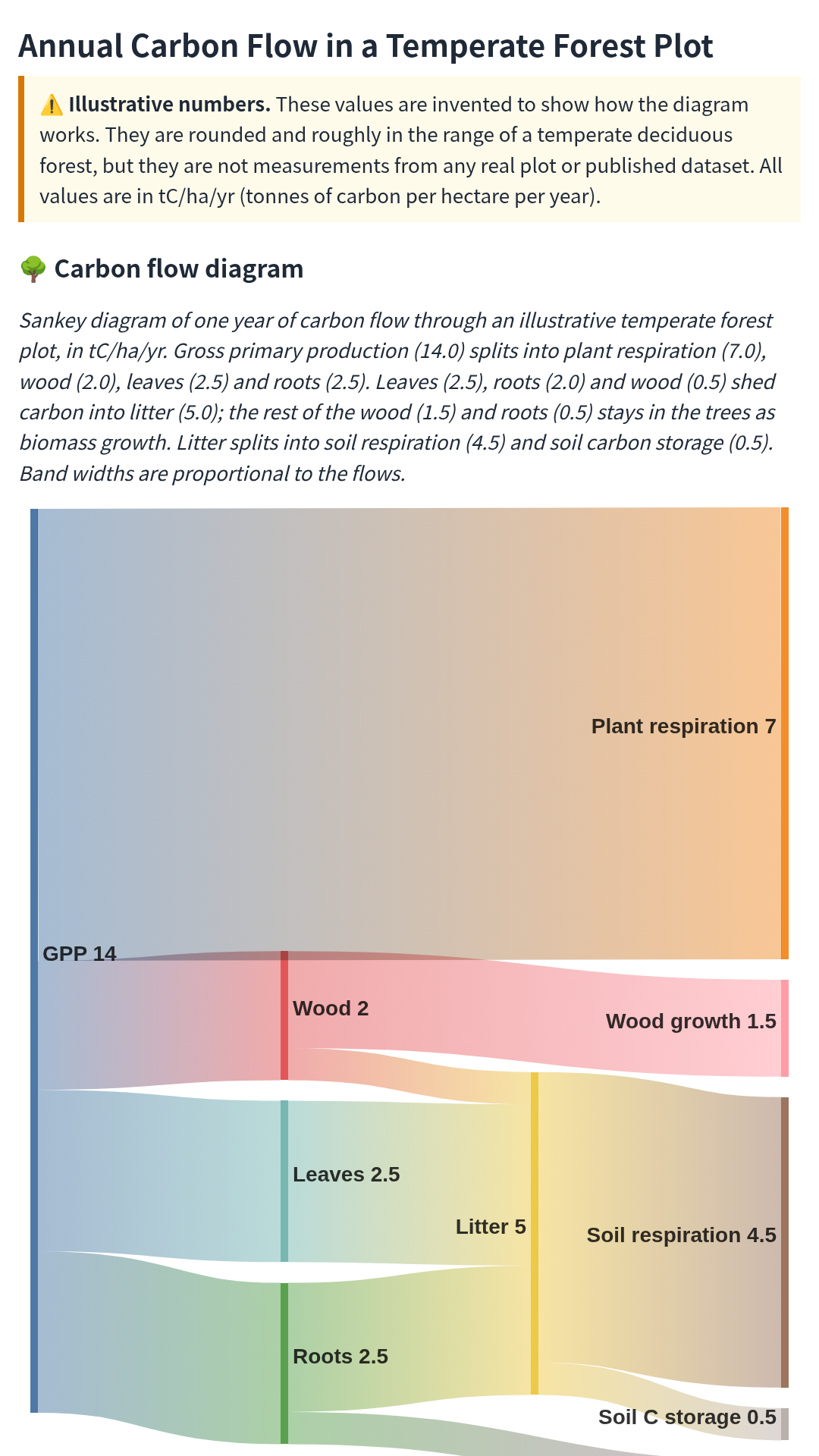
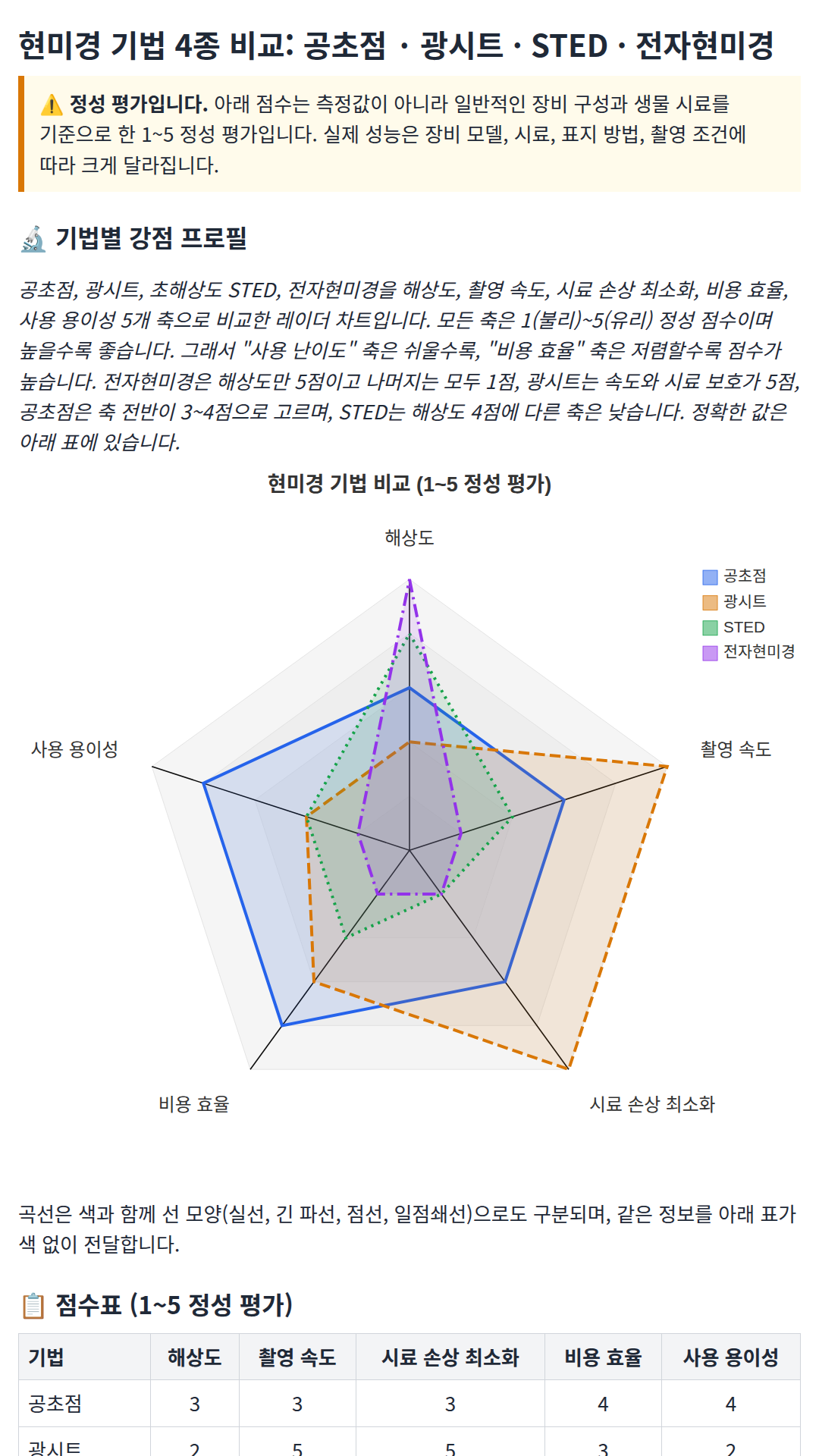
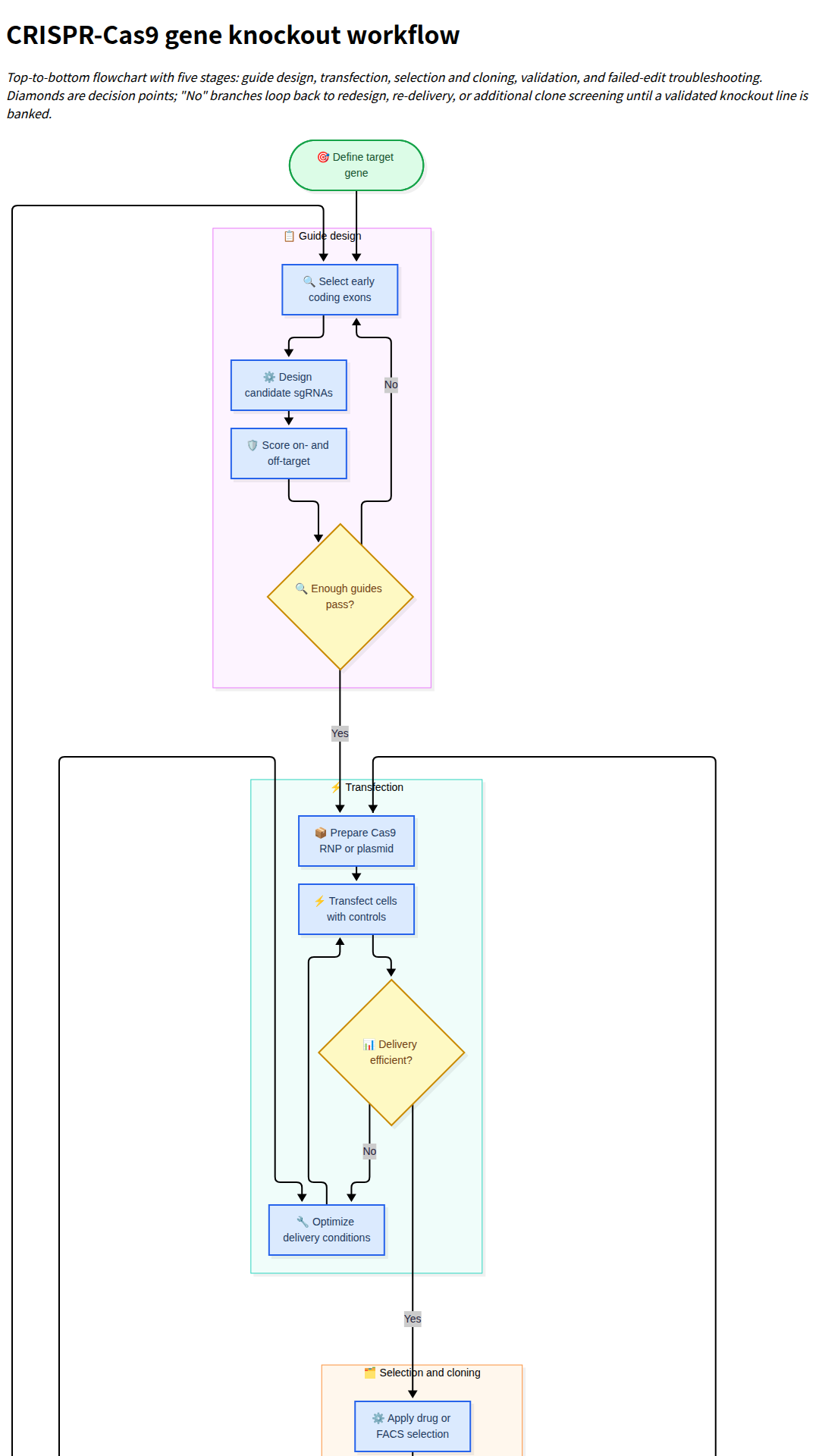
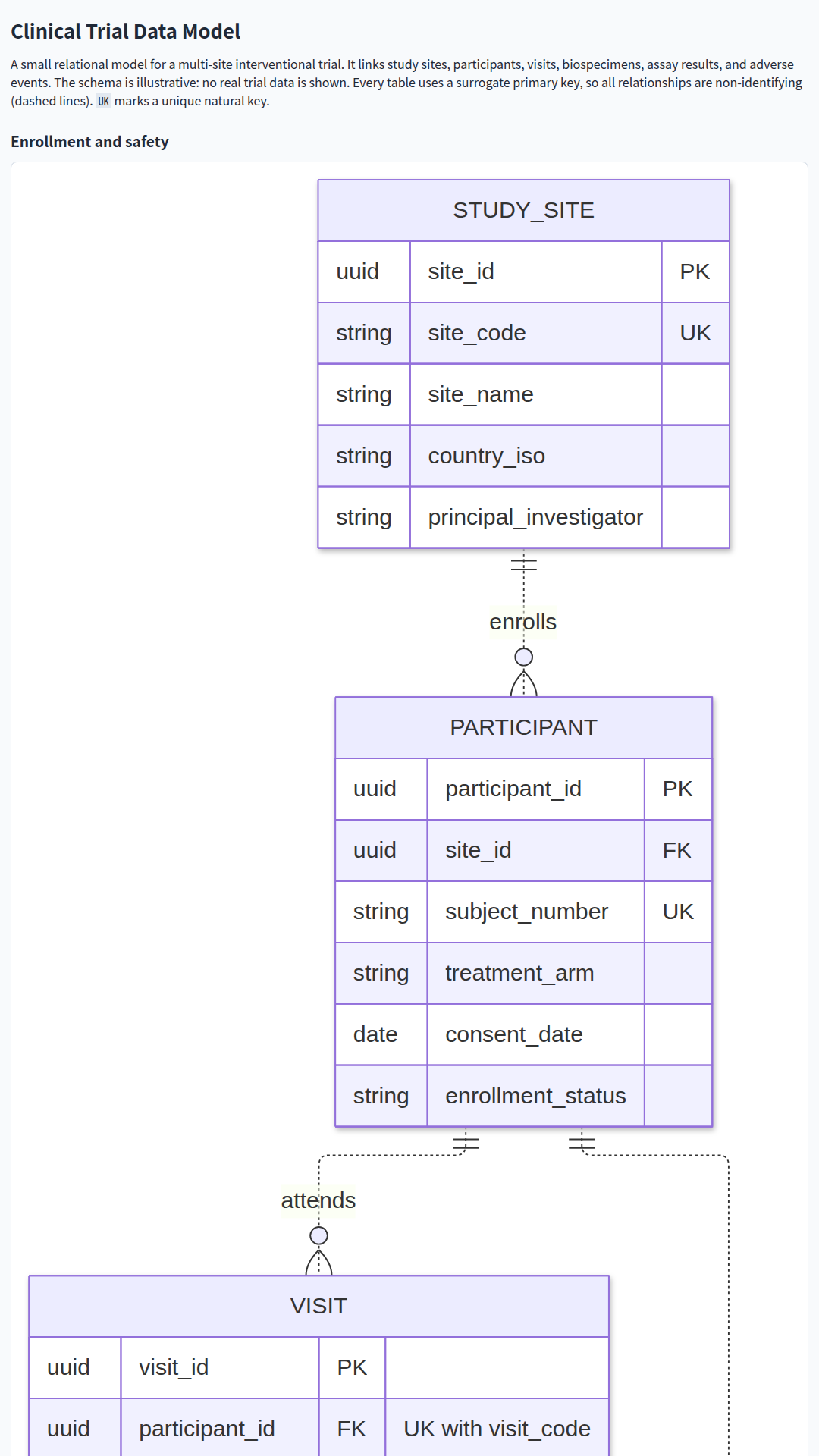
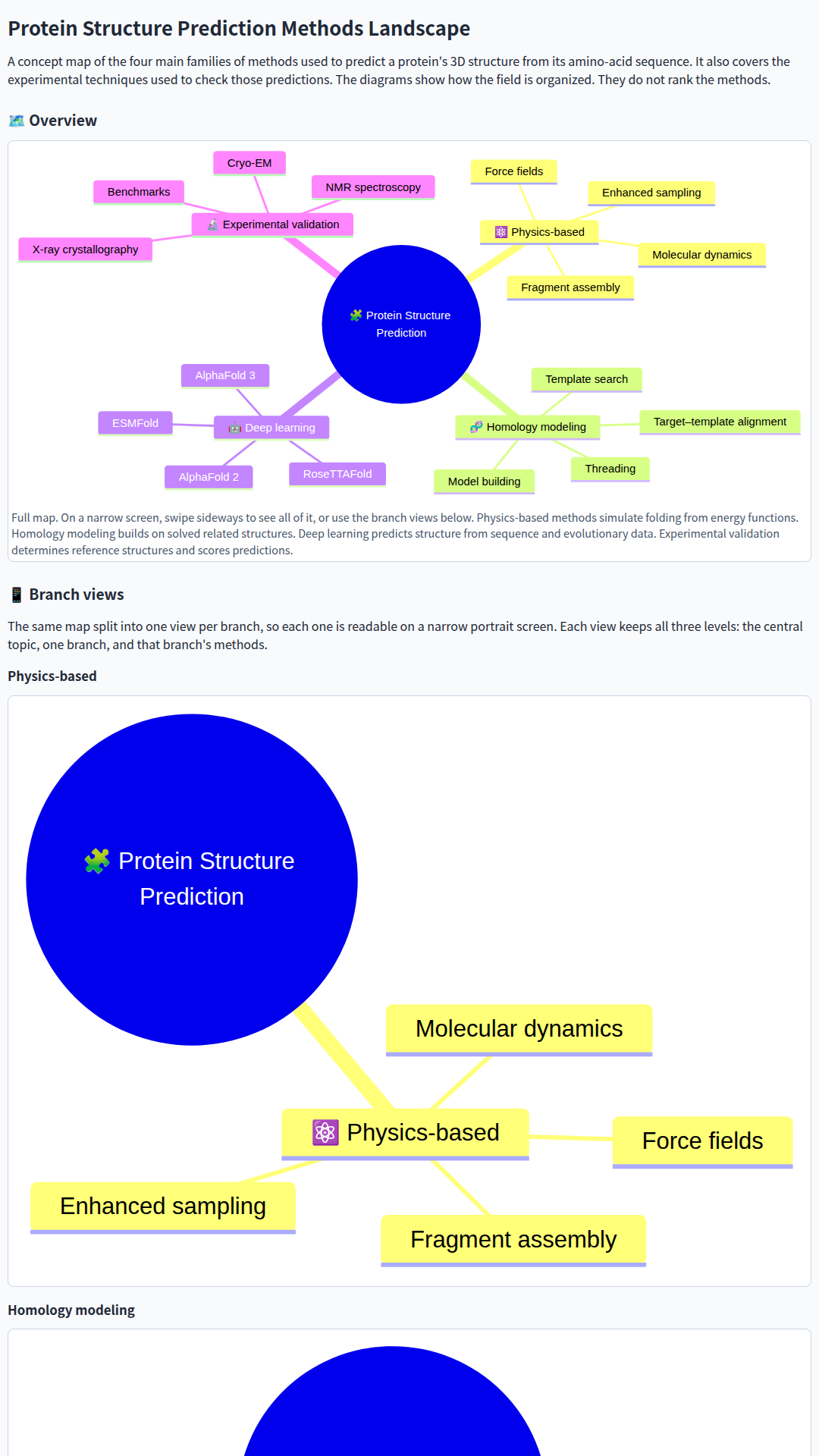
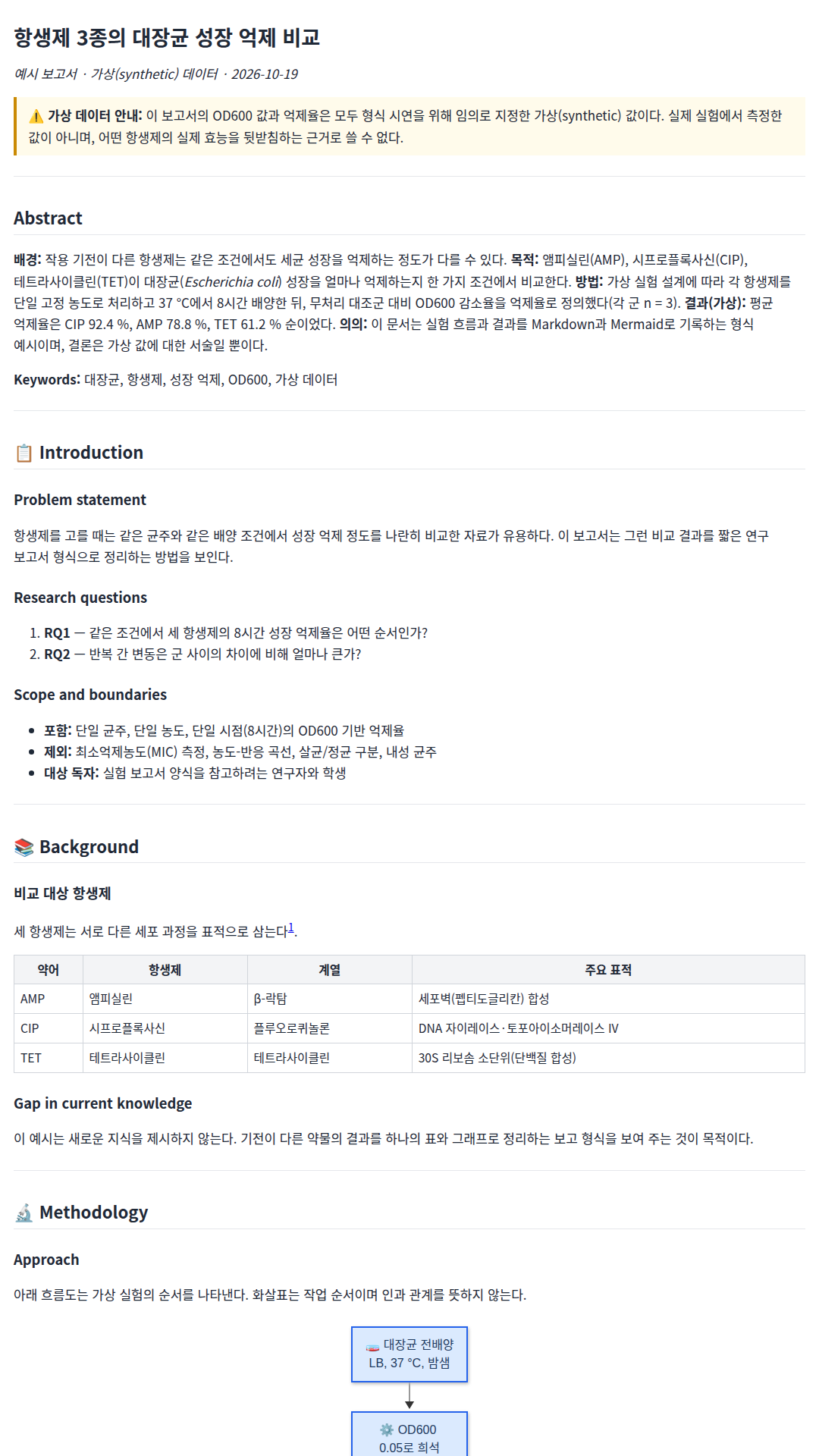
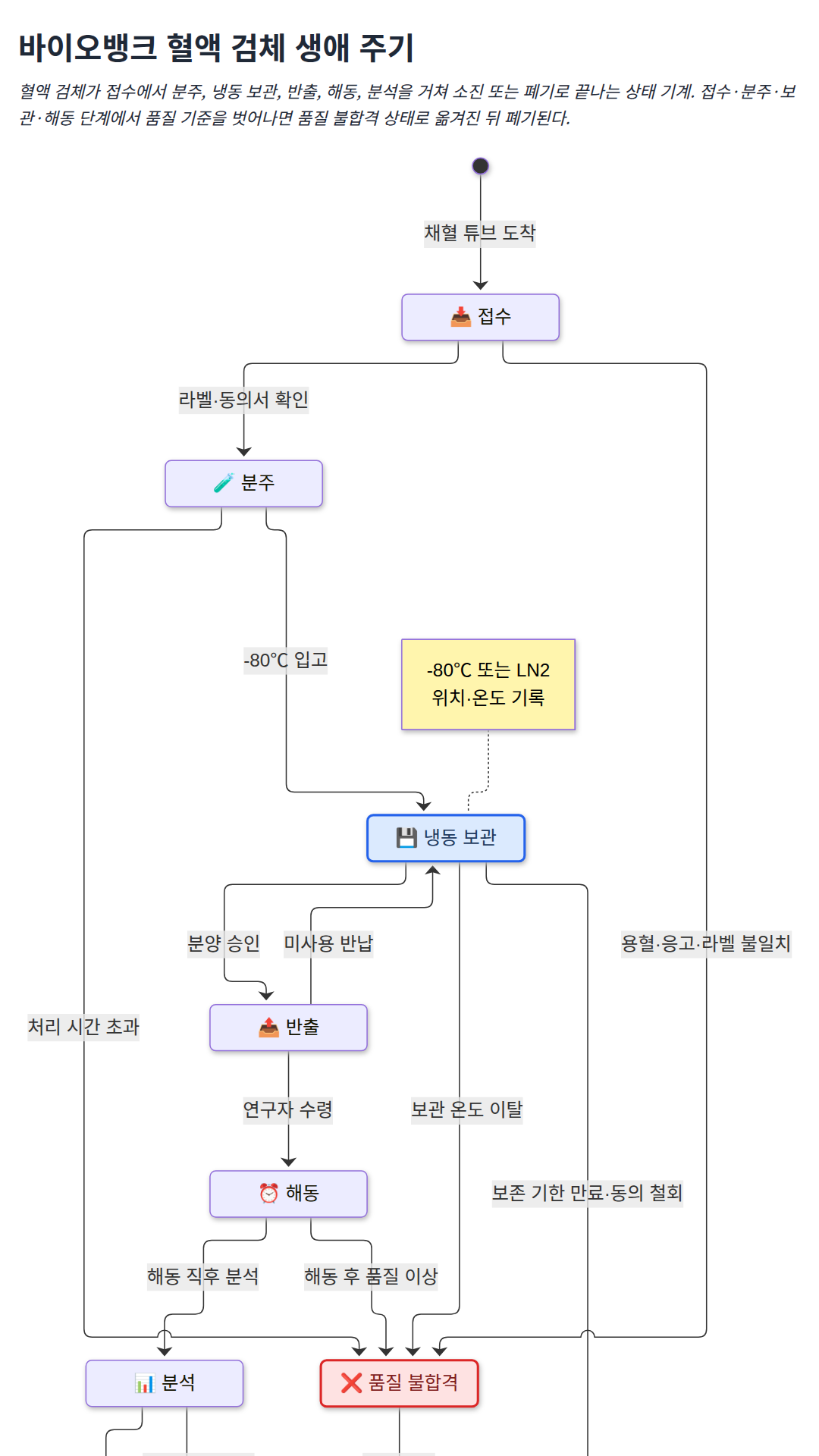
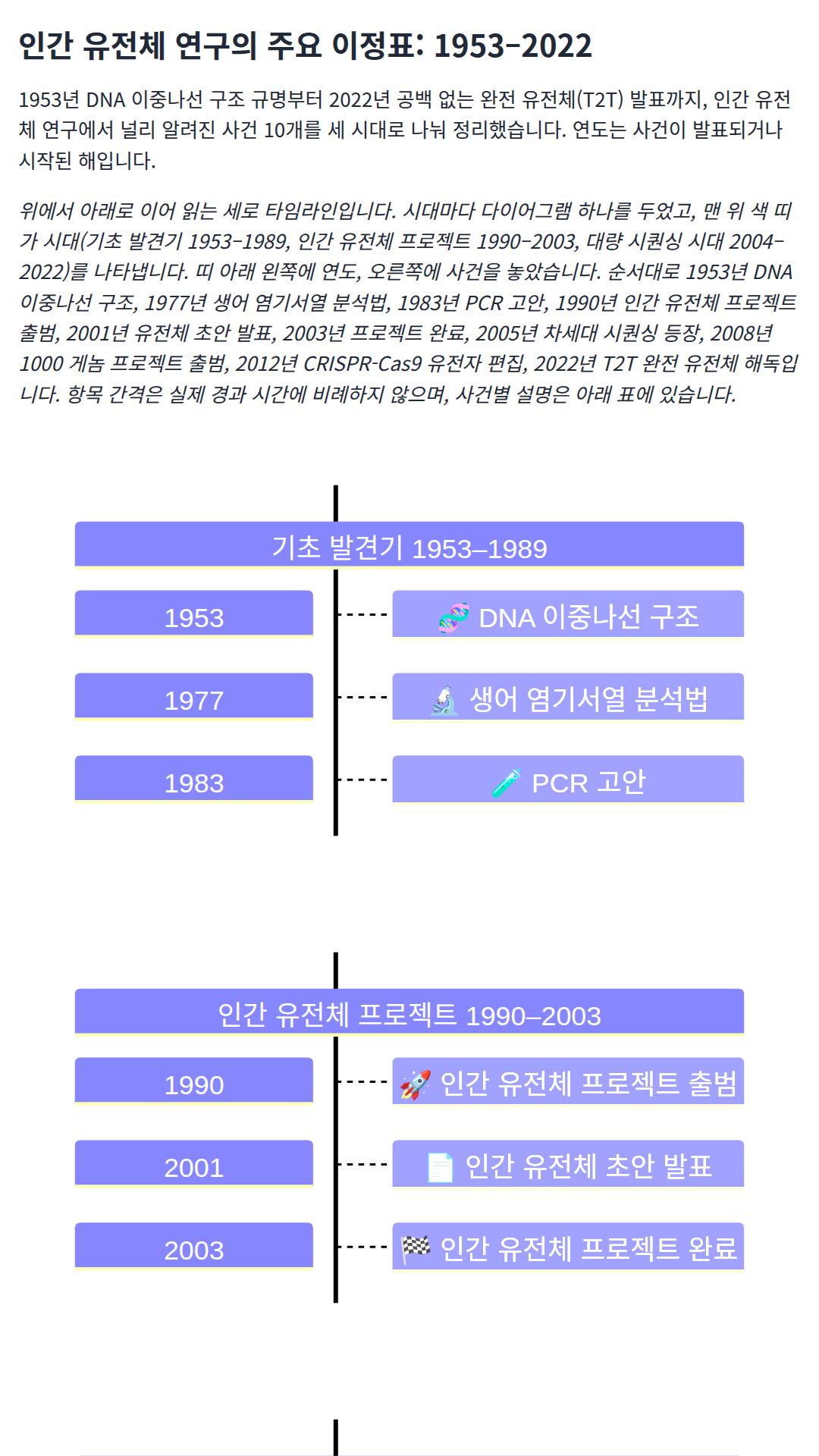
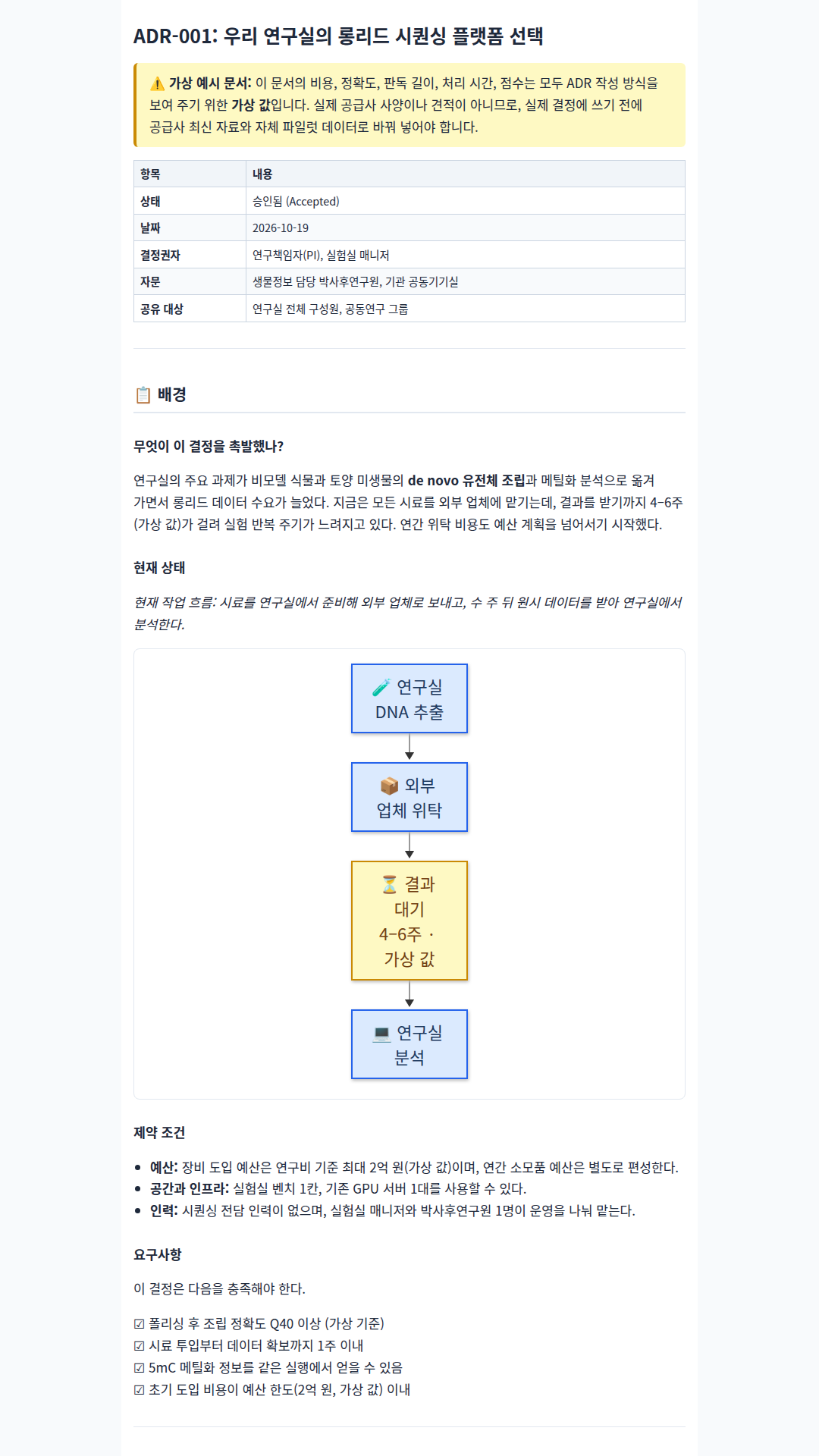
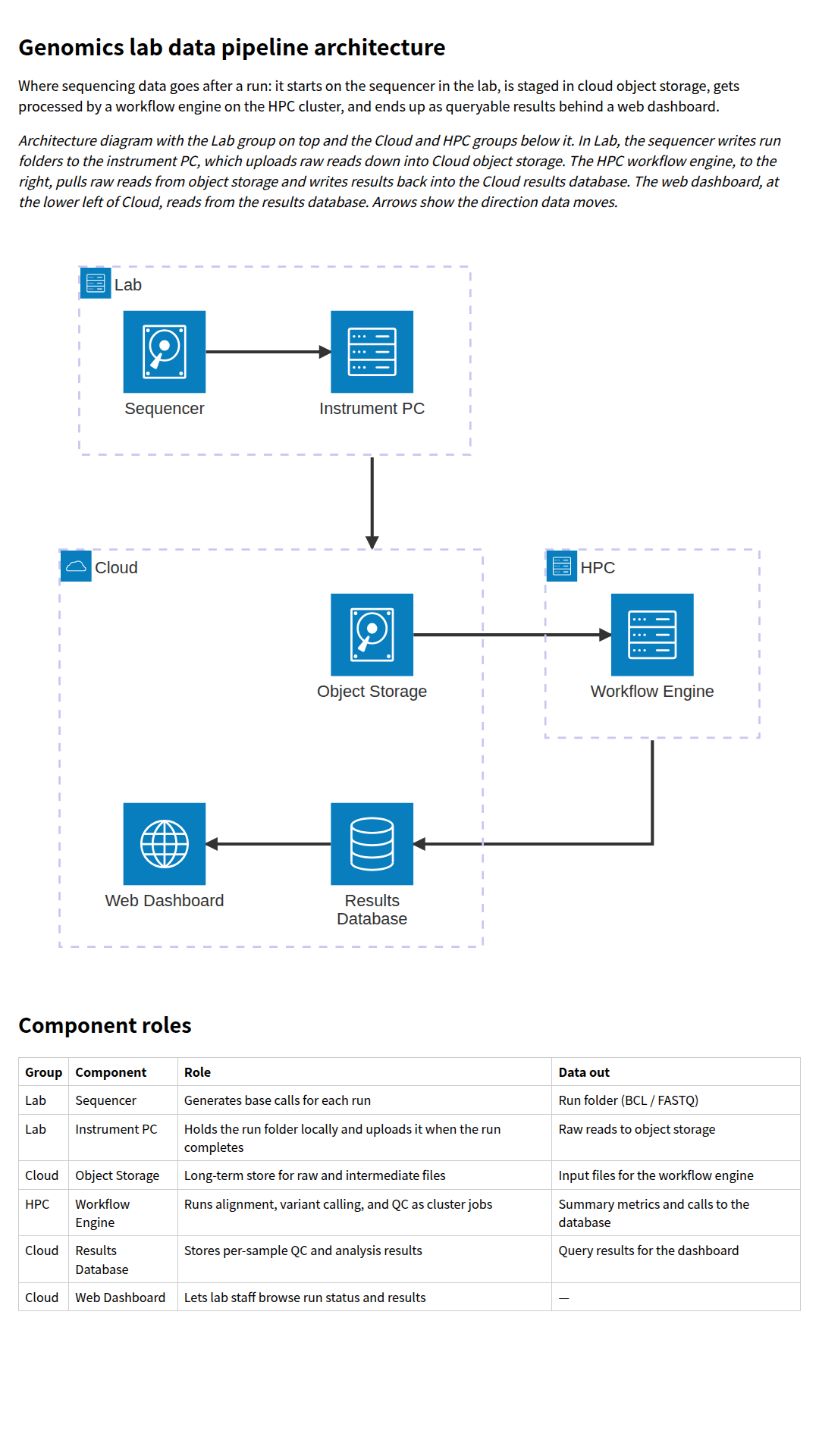
run04 · "단일세포 RNA-seq로 본 종양 미세환경" 18개월 박사 연구 계획 간트 차트. 6개 단계, 위험 구간(빨간 막대), 마일스톤 3개와 표markdown-mermaid-writing 스킬을 사용해서 '단일세포 RNA-seq로 본 종양 미세환경' 박사 과정 연구 18개월 계획을 Mermaid 간트 차트로 그려 줘. 문헌 조사, 샘플 수집, 라이브러리 제작, 시퀀싱, 분석, 논문 작성 단계와 마일스톤 3개를 넣고, 스킬의 gantt 가이드를 먼저 읽어 줘. 결과는 phd_gantt.md(마크다운 원본)와 phd_gantt.html(스킬의 references/current-rendering.md 예시처럼 CDN의 Mermaid 12로 다이어그램을 렌더링하는 단독 페이지) 두 파일로 저장해 줘. 폭 1080px 정도의 세로 휴대폰 화면에 맞게 배치하고, 렌더링 확인용 임시 파일은 ./_scratch/ 아래에 둬.run08 · 가상 신약 후보 8개를 예측 효능(x)과 안전 여유(y)로 나눈 사분면 차트(진행·최적화·우선순위 하향)와 점수 표Use the markdown-mermaid-writing skill to make a Mermaid quadrant chart that triages 8 hypothetical drug candidates by predicted efficacy (x) and safety margin (y), with labeled quadrants such as 'advance', 'optimize', 'deprioritize'. State clearly that the values are invented. Read the skill's quadrant guide first. Save drug_quadrant.md (the Markdown source) and drug_quadrant.html, a standalone page that renders the diagram(s) with Mermaid 12 from the CDN as in the skill's references/current-rendering.md. Lay it out for a portrait phone screen about 1080px wide. Put any scratch render checks under ./_scratch/.run10 · 온대림 연간 탄소 흐름(총일차생산 14 tC/ha/yr이 호흡·목재·잎·뿌리·낙엽·토양으로 나뉨)을 수지가 맞는 예시 수치로 그린 생키 다이어그램Use the markdown-mermaid-writing skill to draw a Mermaid sankey diagram of the annual carbon flow in a temperate forest plot (gross primary production split into plant respiration, wood, leaves, roots, litter, soil respiration). Use clearly labeled illustrative numbers in tC/ha/yr that balance. Read the skill's sankey guide first. Save forest_carbon_sankey.md (the Markdown source) and forest_carbon_sankey.html, a standalone page that renders the diagram(s) with Mermaid 12 from the CDN as in the skill's references/current-rendering.md. Lay it out for a portrait phone screen about 1080px wide. Put any scratch render checks under ./_scratch/.run12 · 공초점·광시트·STED·전자현미경을 해상도·속도·시료 손상·비용·사용 난이도 5축 1~5점 정성 평가로 비교한 한국어 레이더 차트와 점수표markdown-mermaid-writing 스킬로 현미경 기법 4가지(공초점, 광시트, 초해상도 STED, 전자현미경)를 해상도·촬영 속도·시료 손상 최소화·비용 효율·사용 난이도 5개 축으로 비교하는 Mermaid radar-beta 차트를 만들어 줘. 점수는 1~5 정성 평가라고 밝히고, 정확한 값을 담은 표도 함께 넣어 줘. 스킬의 radar 가이드를 먼저 읽어 줘. 결과는 microscopy_radar.md(마크다운 원본)와 microscopy_radar.html(스킬의 references/current-rendering.md 예시처럼 CDN의 Mermaid 12로 다이어그램을 렌더링하는 단독 페이지) 두 파일로 저장해 줘. 폭 1080px 정도의 세로 휴대폰 화면에 맞게 배치하고, 렌더링 확인용 임시 파일은 ./_scratch/ 아래에 둬.run01 · CRISPR-Cas9 유전자 녹아웃 실험 흐름을 단계별 서브그래프와 실패 시 되돌아가는 판단 분기로 그린 Mermaid 플로차트Use the markdown-mermaid-writing skill to diagram a CRISPR-Cas9 gene knockout experiment workflow (guide design, transfection, selection, validation, decision points for failed edits) as a Mermaid flowchart. Save the Markdown source as crispr_workflow.md and a standalone crispr_workflow.html that renders the diagram with Mermaid 12 from the CDN, following the skill's references/current-rendering.md browser embedding example.run03 · 임상시험 데이터 모델(시험기관·참여자·방문·검체·분석 결과·이상 사례)을 PK/FK와 관계 기호로 표시한 ER 다이어그램Use the markdown-mermaid-writing skill to design a Mermaid ER diagram for a small clinical-trial data model: participants, study sites, visits, biospecimens, assay results, and adverse events, with keys and cardinalities. Read the skill's ER guide first. Save trial_schema.md (the Markdown source) and trial_schema.html, a standalone page that renders the diagram(s) with Mermaid 12 from the CDN as in the skill's references/current-rendering.md. Lay it out for a portrait phone screen about 1080px wide. Put any scratch render checks under ./_scratch/.run05 · 단백질 구조 예측 방법(물리 기반·상동성 모델링·딥러닝·실험 검증)을 3단계로 펼친 마인드맵과, 휴대폰용 가지별 확대 보기Use the markdown-mermaid-writing skill to build a Mermaid mindmap of the protein structure prediction methods landscape (physics-based, homology modeling, deep learning, experimental validation), 3 levels deep. Read the skill's mindmap guide first. Save protein_mindmap.md (the Markdown source) and protein_mindmap.html, a standalone page that renders the diagram(s) with Mermaid 12 from the CDN as in the skill's references/current-rendering.md. Lay it out for a portrait phone screen about 1080px wide. Put any scratch render checks under ./_scratch/.run06 · research_paper 템플릿으로 쓴 "항생제 3종의 대장균 성장 억제 비교" 한국어 보고서. 가상 데이터 경고, 실험 흐름도, 억제율 막대 그래프 포함markdown-mermaid-writing 스킬의 templates/research_paper.md 템플릿을 써서 '항생제 3종의 대장균 성장 억제 비교'라는 짧은 연구 보고서를 써 줘. 데이터는 가상(synthetic)이라고 명시하고, 실험 흐름 flowchart 1개와 억제율 xychart-beta 막대 그래프 1개를 넣어 줘. 결과는 antibiotic_report.md(마크다운 원본)와 antibiotic_report.html(스킬의 references/current-rendering.md 예시처럼 CDN의 Mermaid 12로 다이어그램을 렌더링하는 단독 페이지) 두 파일로 저장해 줘. 폭 1080px 정도의 세로 휴대폰 화면에 맞게 배치하고, 렌더링 확인용 임시 파일은 ./_scratch/ 아래에 둬.run07 · 바이오뱅크 혈액 검체의 접수부터 폐기까지 상태와 전이 조건을 한국어 라벨로 그린 상태 다이어그램markdown-mermaid-writing 스킬로 바이오뱅크 검체(혈액 샘플)의 생애 주기를 Mermaid 상태 다이어그램(stateDiagram-v2)으로 그려 줘. 접수, 분주, 냉동 보관, 반출, 해동, 분석, 폐기, 품질 불합격 같은 상태와 전이 조건을 한국어 라벨로 넣고, 스킬의 state 가이드를 먼저 읽어 줘. 결과는 biobank_states.md(마크다운 원본)와 biobank_states.html(스킬의 references/current-rendering.md 예시처럼 CDN의 Mermaid 12로 다이어그램을 렌더링하는 단독 페이지) 두 파일로 저장해 줘. 폭 1080px 정도의 세로 휴대폰 화면에 맞게 배치하고, 렌더링 확인용 임시 파일은 ./_scratch/ 아래에 둬.run09 · 1953년 DNA 이중나선부터 2022년 T2T 완전 유전체까지 인간 유전체 연구 이정표 10개를 세 시대로 나눈 한국어 타임라인markdown-mermaid-writing 스킬로 '인간 유전체 연구의 주요 이정표'를 Mermaid timeline 다이어그램으로 만들어 줘. 1953년 DNA 이중나선 구조부터 2022년 T2T 완전 유전체까지 널리 알려진 사건 8~10개로 구성하고, 시대 구분 섹션을 넣어 줘. 스킬의 timeline 가이드를 먼저 읽어 줘. 결과는 genome_timeline.md(마크다운 원본)와 genome_timeline.html(스킬의 references/current-rendering.md 예시처럼 CDN의 Mermaid 12로 다이어그램을 렌더링하는 단독 페이지) 두 파일로 저장해 줘. 폭 1080px 정도의 세로 휴대폰 화면에 맞게 배치하고, 렌더링 확인용 임시 파일은 ./_scratch/ 아래에 둬.run11 · decision_record 템플릿으로 쓴 "롱리드 시퀀싱 플랫폼 선택" 한국어 ADR. 가상 수치 경고, 현재 흐름도, 후보 비교 표 포함markdown-mermaid-writing 스킬의 templates/decision_record.md 템플릿으로 '우리 연구실의 롱리드 시퀀싱 플랫폼 선택' 아키텍처 결정 기록(ADR)을 써 줘. 후보 3개를 비교하는 표, 결정 과정을 보여 주는 flowchart를 넣고, 비용·정확도 수치는 가상 예시라고 표시해 줘. 결과는 sequencing_adr.md(마크다운 원본)와 sequencing_adr.html(스킬의 references/current-rendering.md 예시처럼 CDN의 Mermaid 12로 다이어그램을 렌더링하는 단독 페이지) 두 파일로 저장해 줘. 폭 1080px 정도의 세로 휴대폰 화면에 맞게 배치하고, 렌더링 확인용 임시 파일은 ./_scratch/ 아래에 둬.run13 · 시퀀서→기기 PC→클라우드 객체 저장소→HPC 워크플로 엔진→결과 DB→웹 대시보드로 이어지는 유전체 연구실 데이터 파이프라인 architecture-beta 다이어그램Use the markdown-mermaid-writing skill to document a genomics lab data pipeline as a Mermaid architecture-beta diagram: sequencer, instrument PC, object storage, workflow engine on an HPC cluster, results database, and a web dashboard, grouped into 'lab', 'cloud', and 'HPC' groups. Read the skill's architecture guide first. Save lab_pipeline_arch.md (the Markdown source) and lab_pipeline_arch.html, a standalone page that renders the diagram(s) with Mermaid 12 from the CDN as in the skill's references/current-rendering.md. Lay it out for a portrait phone screen about 1080px wide. Put any scratch render checks under ./_scratch/.